
Using Your Cricut
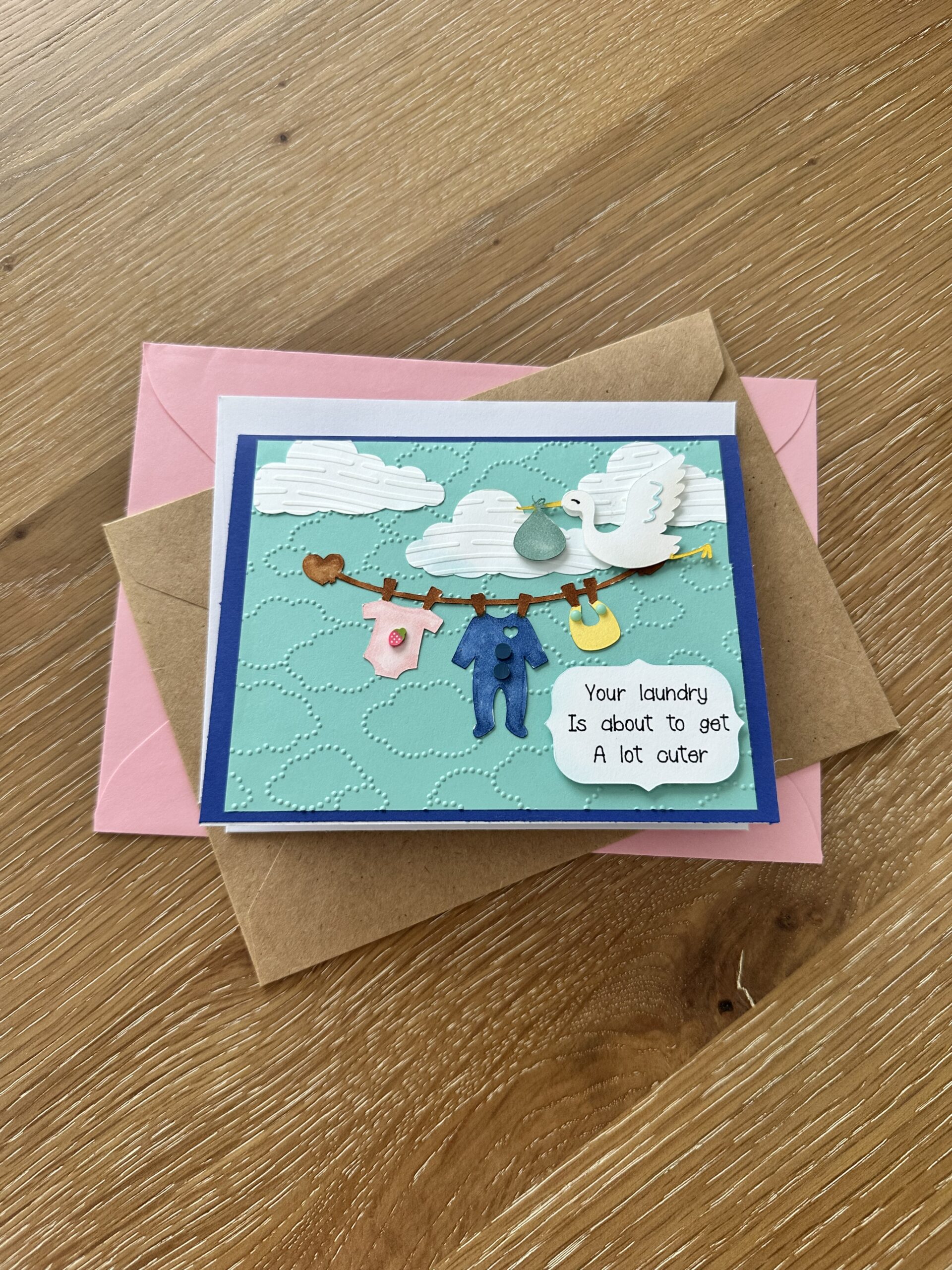
Hello and welcome to my studio! I’m so happy you have popped by! Because I enjoy what I do and I just love sharing my ideas with you. And I couldn’t wait to share this adorable baby shower card I made using one of my favorite crafting tools-the Cricut machine.
The Cricut machine is the most versatile crafting companion. I have hundreds of stamps, dies, embossers and die cutters and all the rest. Yet the Cricut offers hundreds of thousands more! That being said, I needed to make a card for a baby shower and out of all my stock of craft supplies, I had no baby themed stamps or dies or anything. And I didn’t even have the time to order something so I immediately knew to go to my Cricut for help. I had a basic idea of what I wanted the card to look like so all I had to do was choose the images I wanted and allow the machine to do the cutting.
Below, I’ve shared a list of the supplies I used to make this precious baby shower card. I’ve also shared a LINK to my FREE design in Cricut Design Space. You can use that link and it will take you to the design. Then you choose to “Make It” or you can “Customize It”. I’ll explain more about that down in the “Let’s Get Krafty” section.

List of Supplies
- (65lb.+)Card Stock: white, dark blue, light blue
- Glue
- Cricut machine
- Alcohol Markers: brown, pink, blue, yellow, sage green
- Ink Pads: light blue, light brown
- Ink Blending Tools
- Cricut Black Ink Pen
- Embossing Folders: Clouds, wavy pattern
- Adhesive Foam Dots [to raise the sentiment and stork]
- Embellishments like the little strawberry, blue dots, green dots…{optional}
Want more card making & crafting inspiration?
Follow me on social media
Let’s Get Krafty
- First, make the base of the card by taking a piece of white card stock and trimming it to 5.5 x 8.5”. Score @ 4.25”, fold and burnish the score lines. This creates an A2 base which measures 4.25 x 5.5”. OR use an A2 ready made card base.
- Now place dark blue card stock onto the mat of your Cricut machine and ready a
“black Cricut Pen”. - Next, go to my free design HERE
- If you want to keep the measurements of these images to fit an A2 card base, then just click the “Make It” tab and your Cricut will walk you through the rest.
Getting Krafty with Cricut

- Design Space will guide you to place the light blue card stock second, and the white card stock last.
- Your Cricut will guide you to when to load the black ink pen, then it will write the sentiment,
“Your Laundry Is about to get a lot cuter”, and it will cut the sentiment panel for you. From that same white card stock, the Cricut will cut out all of the images for you. The clouds, stork, clothes line. - Once you remove the mat holding the white card stock from the machine, I suggest leaving all of the cut images stuck onto the mat, then use your chosen coloring tools to color in the images as you wish.
- I had the images for this cute baby shower card to cut from white card stock because this was quicker and easier than having the machine to cut all the different tiny elements from all the different colors of card stock.
Completing Your Card Design

- {optional} Use embossing folders to emboss the light blue card panel and the clouds to add texture and interest to your adorable baby shower card.
- Layer your panels onto your card base.
- Lastly, use glue to adhere the clouds and clothes line to the front panel of your card. Use adhesive foam dots to raise the stork and the sentiment. Add any embellishments you wish and that’s it!
- You have made an absolutely adorable baby shower card! That was fun, huh?
WANT TO SEE MORE?
VISIT MY BLOG ARCHIVES
KEEPING IT KRAFTY
If you’re not familiar with Cricut, check out this video for the Cricut Joy Xtra HERE. I am not affiliated with Cricut-I just love their products. I have the Cricut Joy Xtra but the software and any of the designs I share here work with any Cricut machine. So I went into Cricut Design Space, which is the software and app used to design and customize projects and send them to the cutting machine. If you write “baby clothes line” in the search bar, you’ll see it brings up over 16,000 images. Imagine how much room you’d need in your craft room to store all those stamps and dies! Search “Stork” and it brings up over 15,000 images! I mean, need I say more? You may use my free design or choose any number of other images to make an adorable baby shower card like this. So no matter what it is that you decide to make just make it your own. And always remember to keep it Krafty!
